What just happened
You disconnected LetyShops from your social network account, or asked the network — Facebook, for example — to delete your data. Here’s what that means and what to do next.
Nothing has changed on LetyShops yet. Removing an app on the social network’s side only cancels the permission you gave it — it doesn’t touch your LetyShops account or delete anything there. You can still log in to LetyShops with that network if you want to; it will just ask you to approve access again, the same as the first time you connected it.
To actually remove the social network’s data from LetyShops, follow the steps below. They are the same for every network — Facebook, Google, or any other you signed in with.
How to remove a social network’s data
- Log in to LetyShops. Use the social network (it will ask you to approve access again — that’s expected) or any other way you normally sign in.

- If that network is the only way you sign in, set a password first. Go to Settings → Security and login in your LetyShops account and create a password before doing anything else. This step is required — if the network is your only login method, LetyShops won’t let you disconnect it until you have another way back into your account. Skip this step and the next one will simply fail.

- Disconnect the network. In Settings → Security and login, find the social network and unlink it.
- You’re done. The connection is removed immediately.
What gets deleted, and what stays
When you unlink a social network, we delete:
- the connection between your LetyShops account and your account on that network
- your profile ID on that network
- the profile data we’d received about you from that network
We keep:
- your LetyShops account itself
- your email address
- your name and profile picture
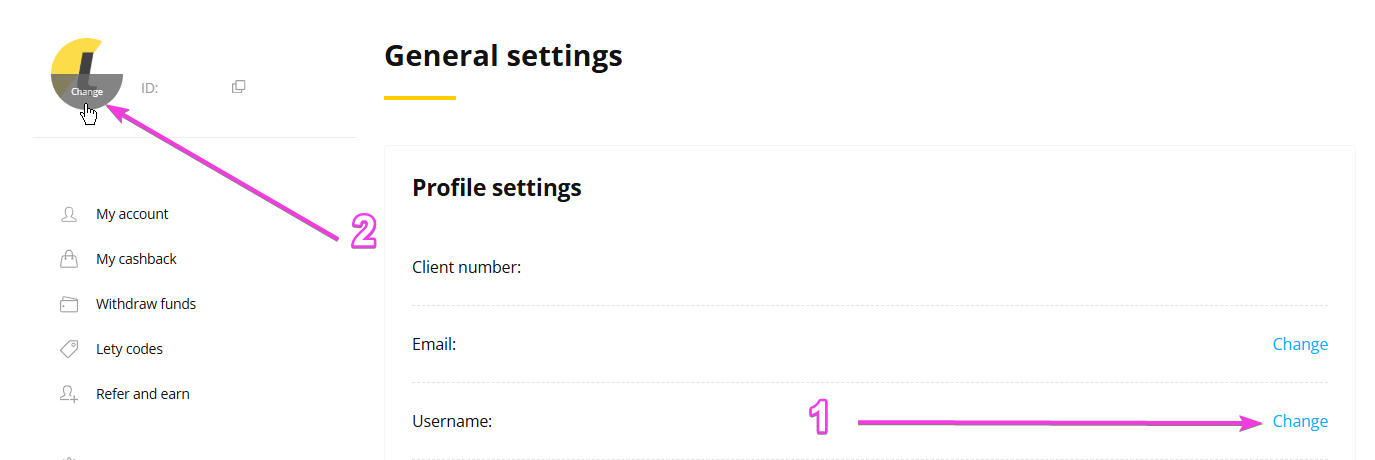
We keep these because they belong to your LetyShops account, not to the social network — they’re your identity on LetyShops, independent of how you log in. If you’d rather change your name or profile picture, you can do that yourself any time in Settings → General settings.
Want delete your account?
Unlinking a social network removes that network’s data but keeps your LetyShops account. If you want your whole LetyShops account deleted, see I want to close my account. Keep in mind that deleting your account also deletes your cashback balance.
Questions
I deleted my social network account entirely and can’t log in to LetyShops anymore.
Contact support@letyshops.com and we’ll help you get back into your account.
I don’t remember having a LetyShops account.
Email support@letyshops.com with the email address the social network used for you, and we’ll check whether an account exists.
How long does this take?
Unlinking a social network happens immediately once you complete the steps above. For full account deletion, see I want to close my account.